Skip to content
SWIMMER PARTY

How it works

Three ways to get an actor

Pick a result: one actor, one reference sheet, or a whole cast. Prepare your assets here, then choose an image or video tool.

Starter pack · fastest start

Site workflow preview

For: your first try, when you want a result now.

Inside: full-body front, face front, the character prompt and a short guide.

Where: "Get starter pack" on any actor page.

  1. Choose a ready-to-cast actor and open their page.
  2. Choose the starter pack and sign in with a free Swimmer account.
  3. Unzip the file. Keep the front views, prompt and credit information together.
Start with one actor

Free for commercial use · Credit Swim In AIPacks require a free Swimmer account.

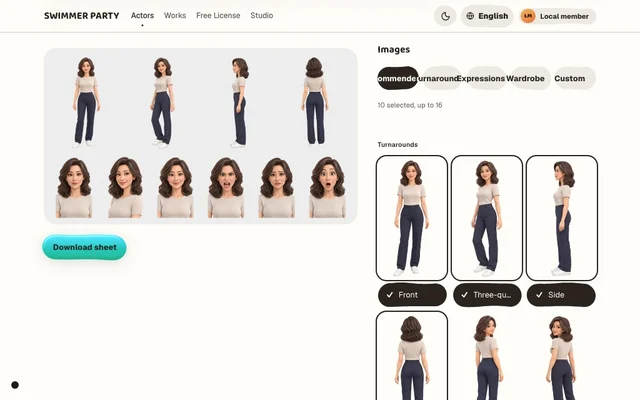
Character sheet · one image says it all

Site workflow preview

For: tools that take one reference image, or when you want to choose angles, expressions and outfits.

Inside: one 4K image made from your picks, with voice, video and prompt if you like.

Where: "Character sheet" on any actor page.

  1. Open a character sheet for an actor with enough images.
  2. Choose a preset or your own images. Check the preview and label language.
  3. Sign in and download the 4K PNG. Adding media creates a ZIP with the attachments.
Make a character sheet

Free for commercial use · Credit Swim In AIPacks require a free Swimmer account.

Cast · several actors, one story

Site workflow preview

For: stories that need more than one actor.

Inside: every actor's starter pack in one file, with the credit line.

Where: "Add to cast" on actor pages, then download from "Your cast".

  1. Add actors to Your cast. The list is saved in this browser.
  2. Open Your cast and check which actors are included.
  3. Sign in and download the cast pack. Each actor has a separate folder.
Open your cast

Free for commercial use · Credit Swim In AIPacks require a free Swimmer account.

Next: choose your tool

These tool workflows are drafts based on official documentation. We have not yet generated and reviewed a result for each recipe. They are not verified tutorials or a promise of matching results.

Draft · not reproduced

Veo · Google Flow

A short greeting from one still

Requires an eligible Google account in a supported region, age 18+, and access to Flow. Check your plan, selected Veo model and credit charge before generating; a paid plan or credits may be required.

Read the draft
Draft · not reproduced

Runway · Gen-4.5

A small gesture, directed with motion

Requires a Runway account on Standard or higher. Gen-4.5 consumes credits; confirm the duration and charge before generating.

Read the draft
Draft · not reproduced

Gemini · image editing

The same actor in a new scene

Requires a signed-in Google account and supported image-editing access. Editing is limited to adults. Available models, quotas and paid features vary by account; check them before submitting.

Read the draft
Draft · not reproduced

Midjourney · Edit model

A character reference in a cafe scene

Requires a Midjourney account and subscription. Check GPU time and image visibility settings; do not assume uploaded-image creations are private.

Read the draft
Draft · not reproduced

Grok Imagine

Animate a still with a simple wave

Requires access to Grok Imagine. Sign in and check the video controls and your current allowance first; subscriptions or extra credits may be required. Web and API access are not interchangeable.
Read the draft

Need something else

One image: open any image and download it. No account needed; wait 30 seconds between images.

Your own selection: tick images in an actor's library and choose "Download selected" — as originals, or packed for GPT Image, Veo or Seedance.

After you download

  1. Upload the images to your image or video tool.
  2. Paste the character prompt.
  3. Describe your scene.

Do I need an account

Not to browse, preview or download single images. Packs need a free Swimmer account — sign in with your email and skip the wait.

Can I use it commercially

Free for commercial use under the usage rules. Credit "Actor name · Swim In AI" and read the full license before publishing.

Browse actors